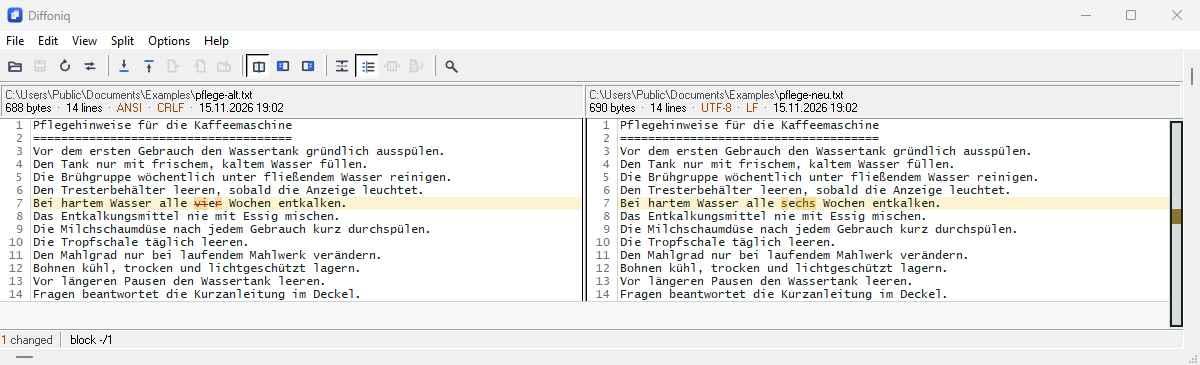
Diffoniq compares text in other languages and scripts, and works with file and folder names written in them. It finds out by itself how a text file is stored, compares what the text says rather than how its bytes look, and writes a file back the way it was stored. The menus and dialogs of Diffoniq are in English.
A text file can store the same text in different ways, called encodings. Diffoniq recognizes these:
| UTF-8 | With or without a byte order mark (a short marker at the start of the file). A file without the mark is read as UTF-8 when its bytes are valid UTF-8. |
| UTF-16 | Little endian and big endian, each recognized by its byte order mark. A UTF-16 file without the mark is full of zero bytes and is compared as a binary file. |
| ANSI | Every other text file is read in the ANSI character set of Windows: the character set Windows uses for programs without Unicode support, for example Windows-1252 on a Western European Windows or Shift-JIS on a Japanese one. This is how older files were stored, and how many programs still store them. |
The second line of the header shows the
encoding of each side — UTF-8, UTF-8+BOM,
UTF-16 LE, UTF-16 BE or ANSI —
next to its line ending (CRLF for Windows, LF for
UNIX). When the two sides differ in either, both values are shown in
amber.
Diffoniq compares the text, not the bytes. A text stored in ANSI and the same text stored as UTF-8 or UTF-16 compare equal: only the lines whose words differ are marked, even when every other line has umlauts. The amber values in the header tell you that the two files still differ byte for byte.
Saving keeps the encoding, the byte order mark and the line endings of the file. Lines you did not change are written back exactly as they were, byte for byte, and a line taken over from the other side is stored in the encoding of the file it goes into. If that is an ANSI file whose character set cannot store some of its characters, Diffoniq asks first: save as UTF-8, save anyway with those characters replaced, or cancel (see Save Modifications).
Windows has an option “Beta: Use Unicode UTF-8 for worldwide language support” (in the Region settings, under Administrative › Change system locale). It makes UTF-8 the character set for programs without Unicode support. Older files are not stored that way, so Diffoniq keeps reading them, and writing them back, in the character set of the language set in the same dialog as the language for non-Unicode programs — Windows-1252 on a German Windows, for example. Text files and the file names in older ZIP files read the same with the option on or off.
File and folder names may be written in any script: in the folder comparison, in command line arguments, in Explorer’s context menu and over the MCP server.
A ZIP file marks its names as Unicode, or it stores them in the character set of the computer it was packed on. Diffoniq reads unmarked names in the character set of your Windows, so a ZIP file packed on a Japanese Windows opens with readable names on a Japanese Windows (see Archives).
In every script — umlauts and accents, Greek, Cyrillic, Hebrew, Arabic, East Asian — a change inside a word is marked on the characters that changed.
Diffoniq has been checked with Japanese, simplified Chinese, Arabic and Hebrew: text files in the ANSI character set of each language, ZIP files packed with names in it, and file and folder names in each script, in the window, on the command line and over the MCP server. For this, Diffoniq ran with the character set of each language, exactly as it would get it from a Windows set to that language, on an otherwise German Windows.
On a Windows user account with Japanese as its display language, Explorer’s context menu, the fonts for Japanese and Chinese text, and the main window and dialogs were checked as well. The Windows option for UTF-8 was checked turned on, on a German Windows.